This integration embeds Circuit’s authentication system directly into your app using an iframe that handles passkey authentication and returns session tokens to use with the API.

Authentication Flow

  1. User sees a Circuit login interface embedded in your app
  2. User authenticates using their passkey (fingerprint, face ID, etc.)
  3. Circuit sends your app a session token via a secure message
  4. Your app receives the token and can now call Circuit’s API
  5. User is logged in with no redirects or popups
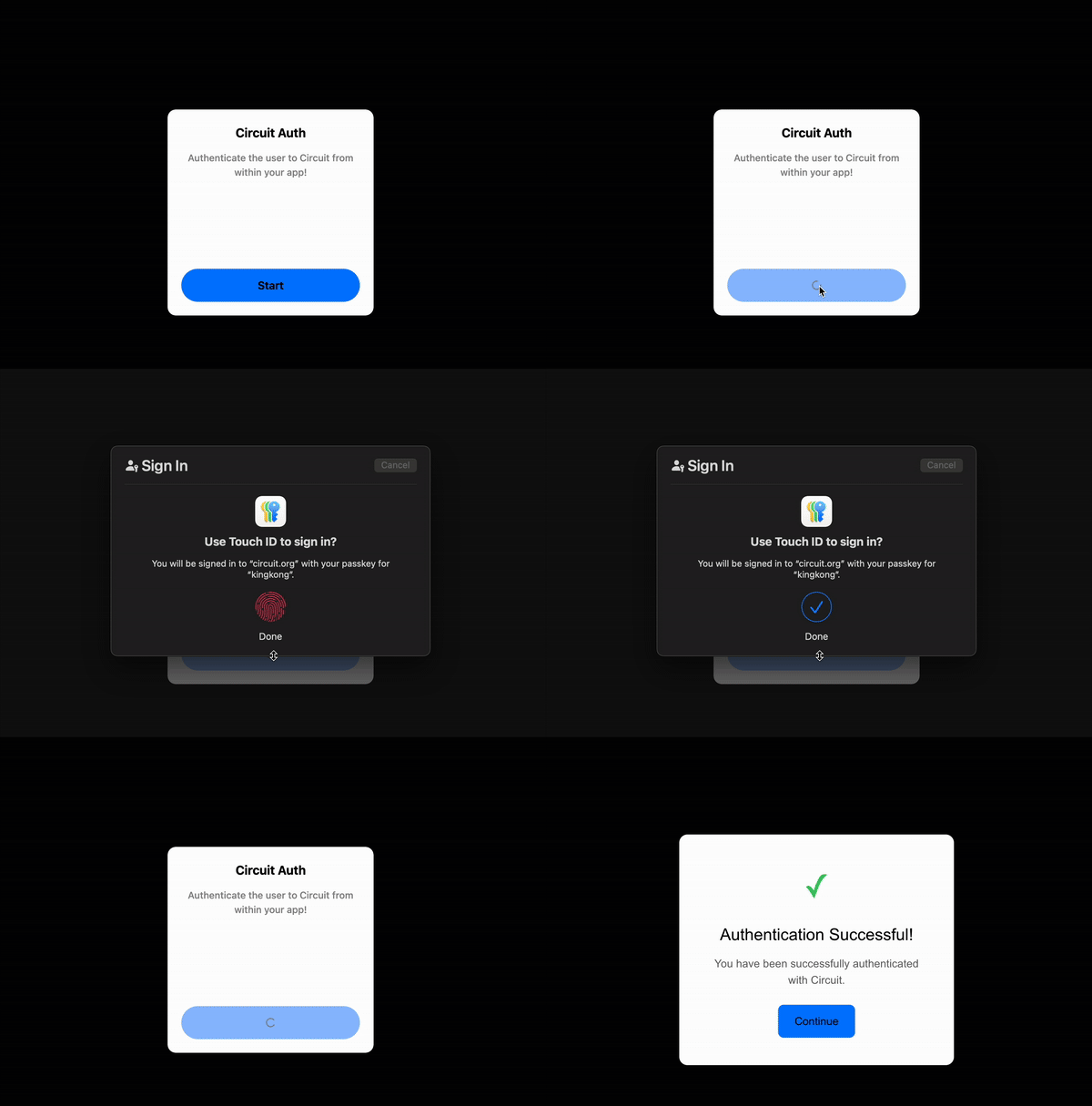
The session token acts like a key that unlocks Circuit’s wallet and agent API for that user.

Implementation Guide

<!DOCTYPE html>
<html>
<head>
    <title>App + Circuit</title>
</head>
<body>
    <h1>Welcome to App + Circuit</h1>

    <!-- Status display -->
    <div id="auth-status">Click the button below to authenticate...</div>

    <!-- Circuit authentication iframe -->
    <iframe
        id="circuit-iframe"
        src="https://app.circuit.org/embed/auth/basic"
        width="400"
        height="500"
        style="border: none; border-radius: 12px; display: block; margin: 20px auto;">
    </iframe>

    <script>
        // This will store the session token later on receipt
        let circuitSessionToken = null;

        // Listen for messages from the Circuit iframe
        window.addEventListener('message', function(event) {
            // SECURITY: Only accept messages from Circuit's domain
            if (event.origin !== 'https://app.circuit.org') return;

            const messageType = event.data.type;
            const messagePayload = event.data.payload;

            // When Circuit iframe finishes loading and is ready
            if (messageType === 'ready') {
                document.getElementById('auth-status').textContent = 'Please authenticate';

                // Configure the iframe
                document.getElementById('circuit-iframe').contentWindow.postMessage({
                    type: 'configure',
                    config: {
                        backgroundColor: '#ffffff',
                        buttonColor: '#007bff',
                        buttonTextColor: '#ffffff',
                        title: 'Login to App + Circuit'
                    },
                    actionType: 'signIn',   // 'register' to register new user
                    username: 'username',   // Replace with actual username
                }, 'https://app.circuit.org');
            }

            // Getting the session token
            if (messageType === 'signInResult' || messageType === 'registerResult') {
                if (messagePayload.success) {
                    // SUCCESS! Get the session token
                    circuitSessionToken = messagePayload.authToken;

                    // Store it for later use
                    localStorage.setItem('circuitSessionToken', circuitSessionToken);

                    // Update the UI
                    document.getElementById('auth-status').textContent = 'Authentication successful';

                    // Now you can call Circuit API

                } else {
                    // Authentication failed
                    const errorMessage = messagePayload.error;
                    document.getElementById('auth-status').textContent = 'Authentication Failed: ' + errorMessage;

                    // Handle user not found error
                    if (errorMessage.includes('No matching passkey found')) {
                        // Try registration instead
                        document.getElementById('circuit-iframe').contentWindow.postMessage({
                            type: 'configure',
                            actionType: 'register',
                            username: 'username',
                            inviteCode: '', // Required for registration
                        }, 'https://app.circuit.org');
                    }
                }
            }
        });
    </script>
</body>
</html>

iframe Message Communication Protocol

DirectionMessage TypeWhen SentPayload
Circuit → Appreadyiframe loaded{ version: '1.0.0' }
App → CircuitconfigureAfter receiving readyjson { actionType, username, inviteCode?, config? }
Circuit → AppsignInResultSign-in completedjson { success: boolean, authToken?: string, error?: string }
Circuit → AppregisterResultRegistration completedjson { success: boolean, authToken?: string, error?: string }

Authentication Requirements

Action TypeRequired FieldsOptional Fields
signInusername (must exist)config
registerusername (must be unique)config

iframe Structure

<iframe
    src="https://app.circuit.org/embed/auth/basic"
    width="400"
    height="500"
    style="border: none; border-radius: 12px;">
</iframe>

Configuration Options

PropertyTypeDescriptionExample
titlestringMain heading text'Welcome to My App'
subtextstringSubtitle text'Sign in to continue'
ctaTextstringButton text'Continue'
backgroundColorstringBackground color'#ffffff'
buttonColorstringButton background color'#007bff'
buttonTextColorstringButton text color'#ffffff'
titleColorstringTitle text color'#333333'
subtextColorstringSubtitle text color'#666666'
radiusnumberBorder radius in pixels12
fontFamilystringFont family'sans-serif'
fontSizestringFont size'14px'

Error Codes And Recovery

Error MessageWhat it MeansRecommended Action
"No matching passkey found"User doesn’t exist in CircuitUser typo or registration
"Username is already taken"Registration failed - username existsAsk user for different username
"Invalid invite code"Wrong or missing invite codeVerify the invite code is correct
"Authentication verification failed"Passkey verification failedAsk user to try again